Add Hardware-Backed Sign-In to Your Application
Building phishing-resistant authentication from scratch means implementing WebAuthn flows, managing attestation, and handling device lifecycle. If your application supports OIDC, Vouch provides these as the identity provider instead.
Vouch is a fully compliant OpenID Connect (opens in new tab) (OIDC) provider. You add “Sign in with Vouch” to any web application, single-page app, or native CLI tool using standard OIDC libraries. Every login is backed by a hardware security key, so the application receives phishing-resistant authentication through the standard OIDC flow.
Choose a guide
Native and CLI apps
Use the Device Authorization Grant for terminals and desktop apps.
Agents and MCP servers
Protect tool servers and agent-to-agent calls with Vouch OIDC tokens.
What you’ll build
By following this guide, you will integrate Vouch as an OIDC identity provider into your application. Users will authenticate with their YubiKey through Vouch, and your application will receive verified identity information including:
- A unique, stable user identifier (
subclaim) in the ID token - The user’s email address in the ID token
- Hardware attestation claim (
hardware_verified) in the access token
This works with any framework or library that supports OpenID Connect or OAuth 2.0 authorization code flow. Beyond web applications, Vouch secures MCP tool servers with bearer token authentication and enables agent-to-agent (A2A) communication backed by hardware-verified identity.
Prerequisites
Before integrating Vouch into your application, you need:
- A registered OAuth application at https://us.vouch.sh/applications
- Your application’s client ID (
client_id) - Your application’s client secret (
client_secret) - A configured redirect URI (e.g.,
https://your-app.example.com/auth/callback)
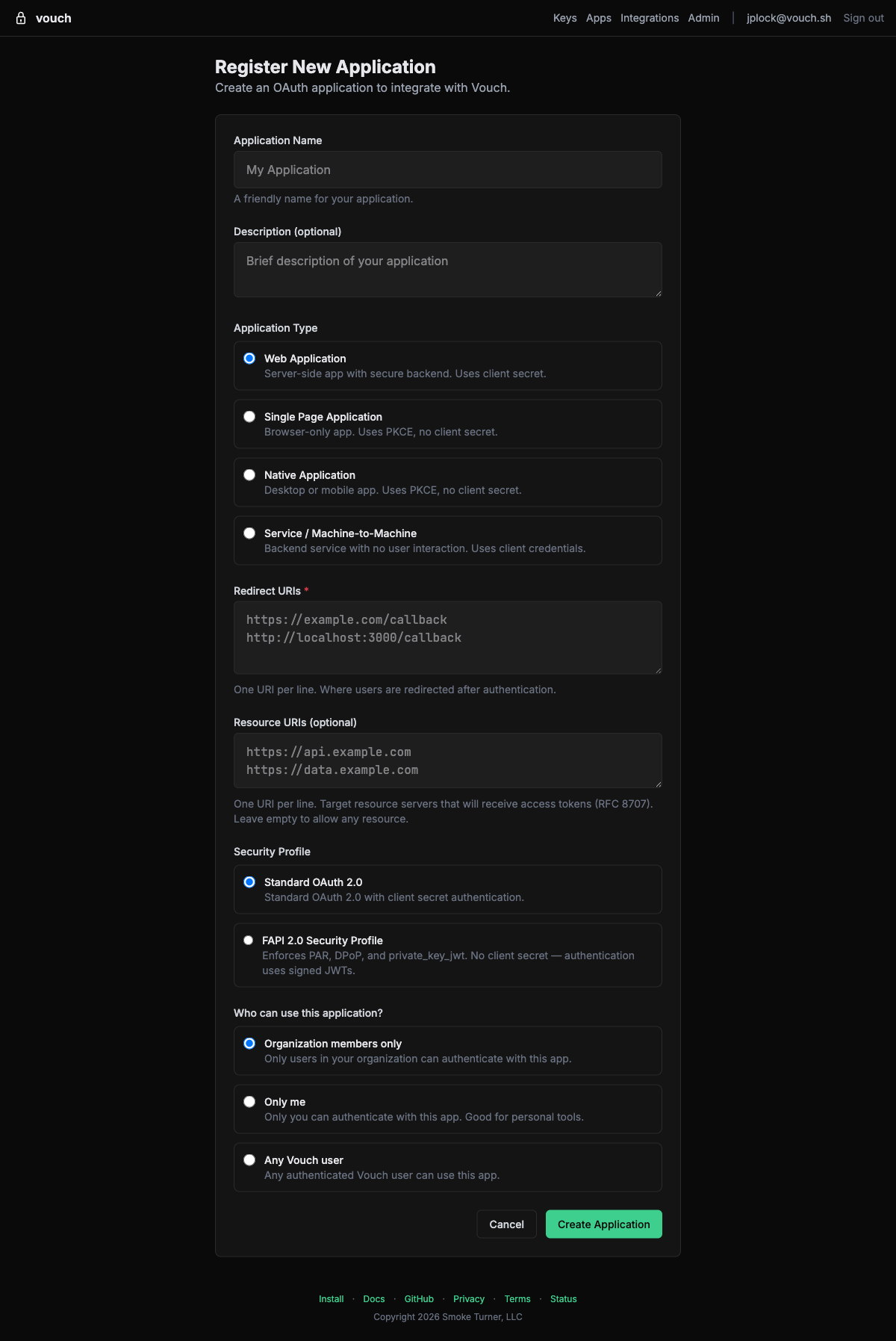
To register an application, navigate to https://us.vouch.sh/applications and click New Application:
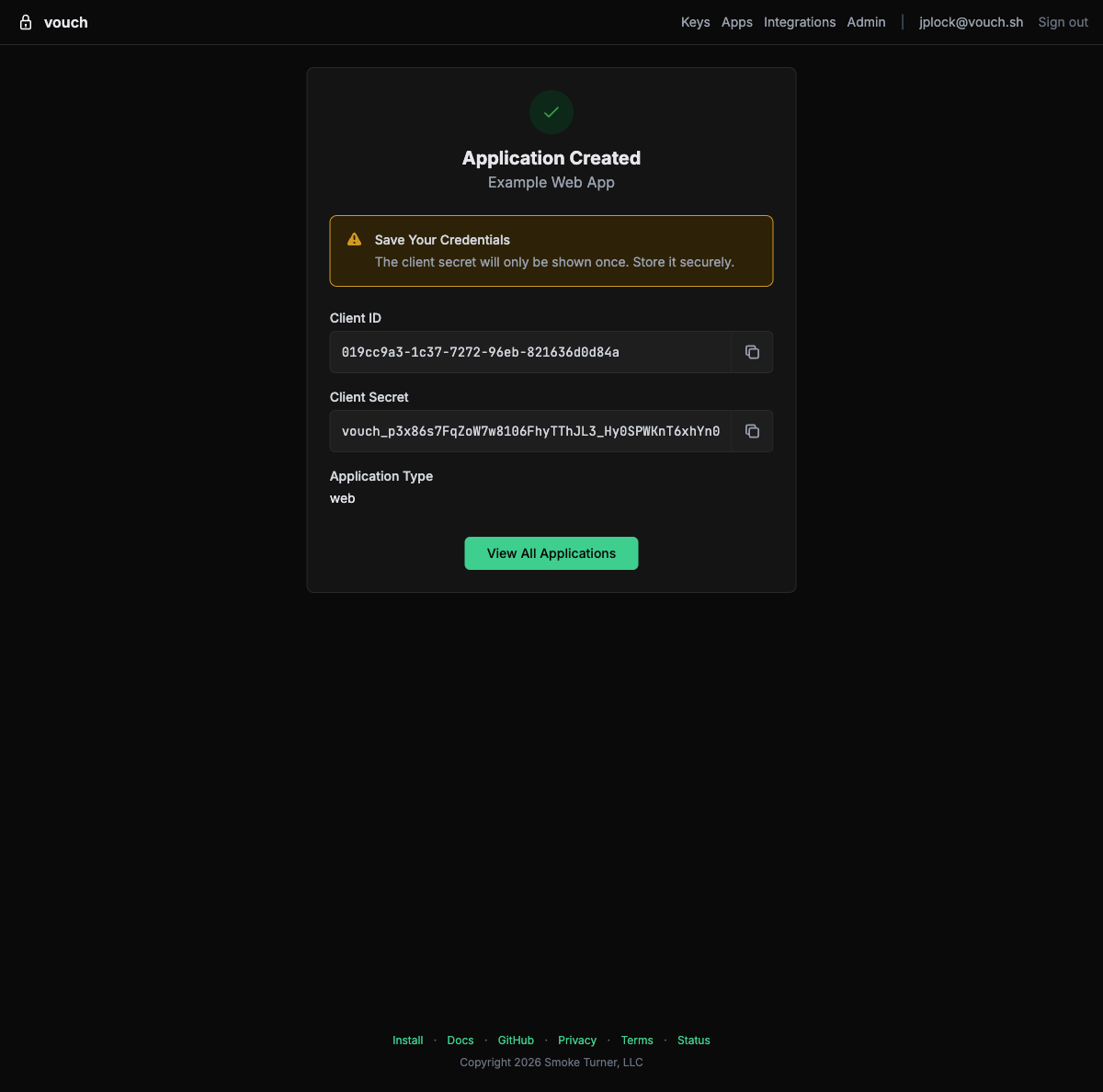
After creating the application, you will see your client ID and client secret. The client secret is only shown once — store it securely.
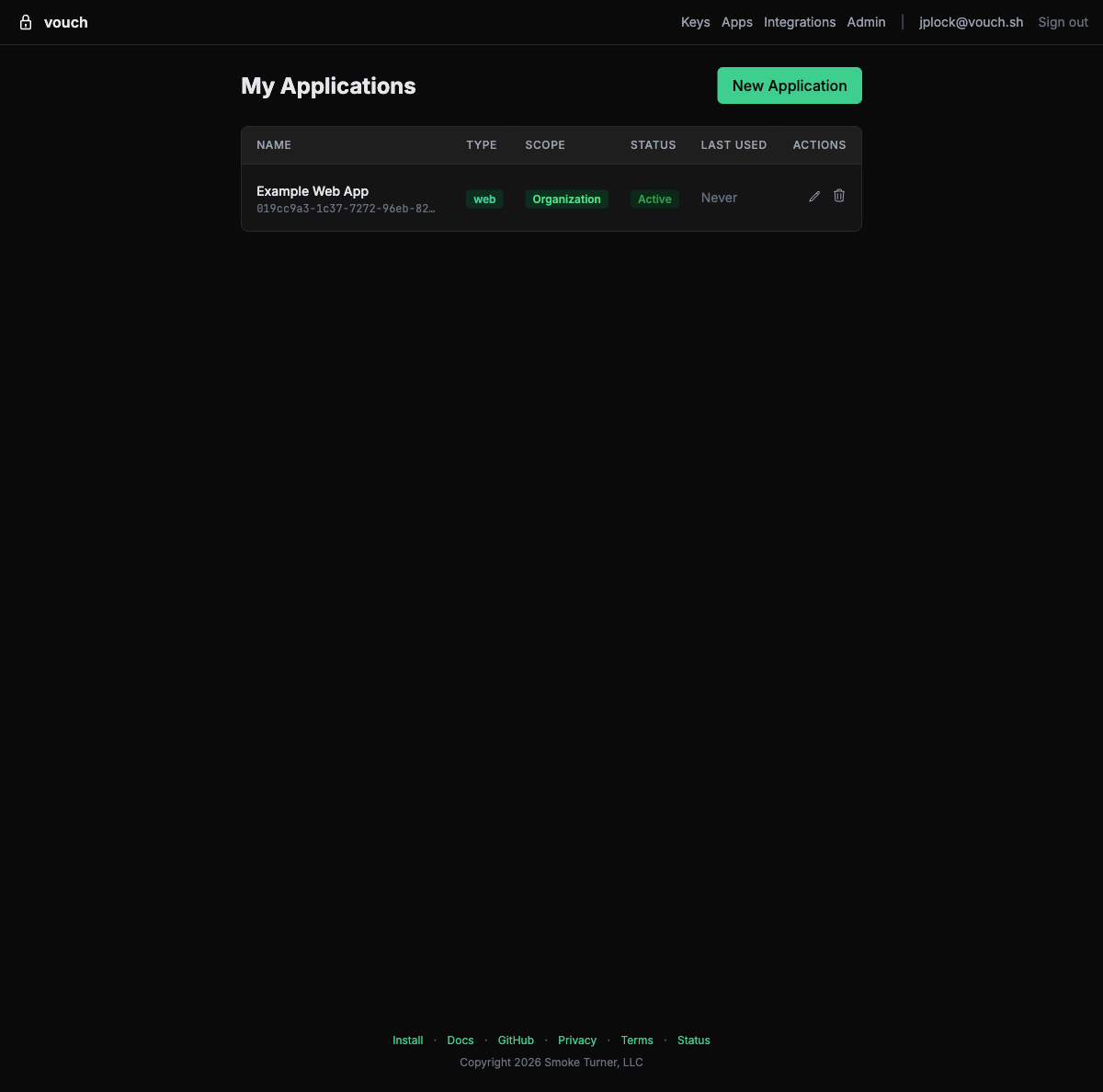
You can view and manage all your applications from the applications list:
Managing Applications
After creating an application, you can view its full configuration — including client ID, type, access scope, redirect URIs, and client secrets — from the application detail page:
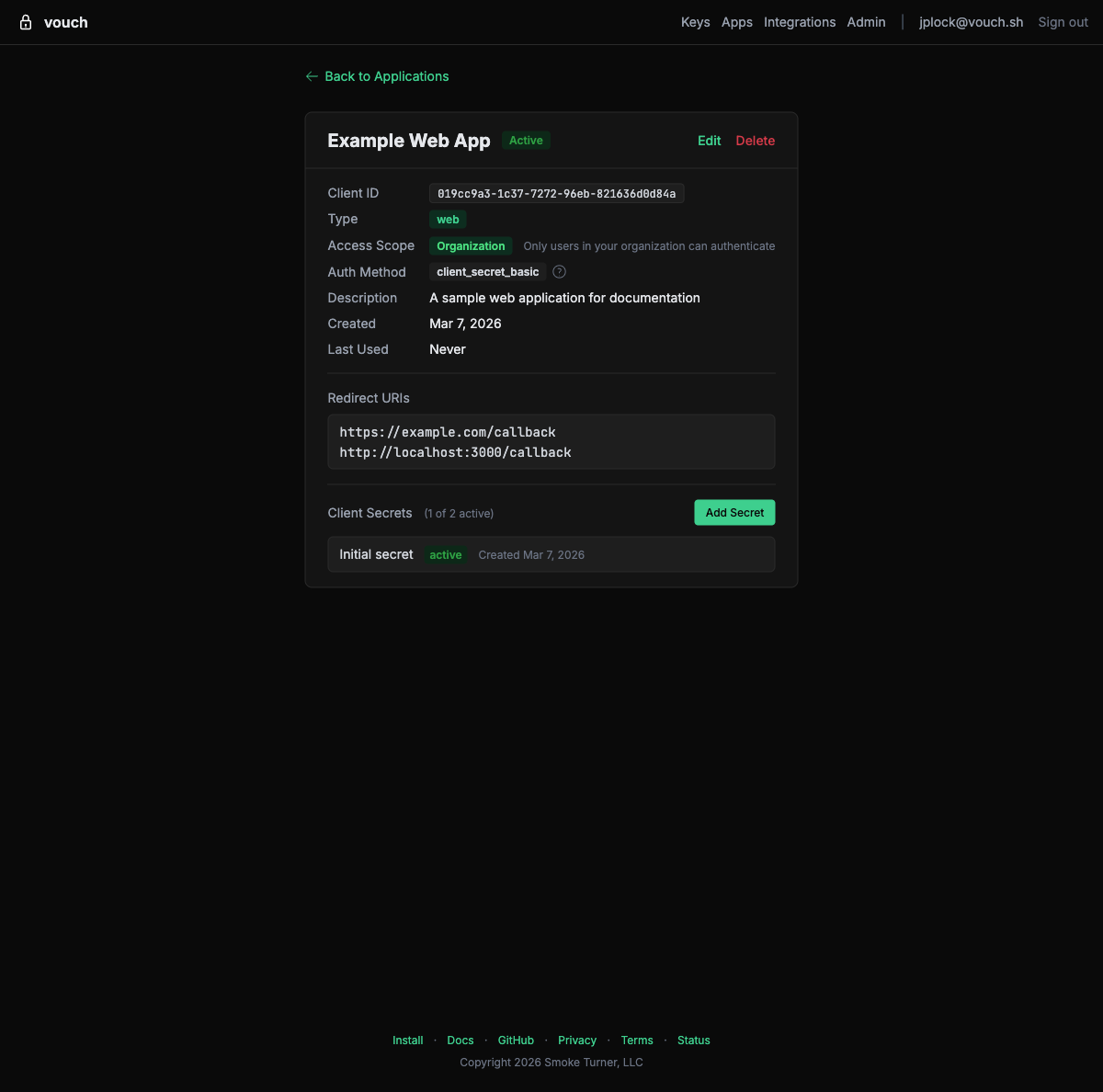
From this page you can edit settings, rotate client secrets, or delete the application.
Access Scopes
Vouch supports two access scopes that control what identity information is included in tokens:
| Scope | Description | Claims Included |
|---|---|---|
openid | Required. Identifies this as an OIDC authentication request. | sub, iss, aud, exp, iat |
email | User email address. | email, email_verified |
Request scopes in the authorization request by including them in the scope parameter, space-separated:
scope=openid email
Rich Authorization Requests
For fine-grained access control beyond what scopes can express, Vouch supports Rich Authorization Requests (RFC 9396 (opens in new tab)). Instead of flat scope strings, your application can pass structured authorization_details objects that describe the type, actions, and resources being requested.
Format
The authorization_details parameter is a JSON array of objects. Each object must include a type field; all other fields are defined by your application:
[
  {
    "type": "account_access",
    "actions": ["read", "transfer"],
    "locations": ["https://api.example.com/accounts"]
  }
]
Using with PAR
Since Vouch uses Pushed Authorization Requests (RFC 9126 (opens in new tab)), include authorization_details in the PAR request body alongside your other parameters:
curl -X POST https://us.vouch.sh/oauth/par \
  -d "client_id=your-client-id" \
  -d "client_secret=your-client-secret" \
  -d "response_type=code" \
  -d "redirect_uri=https://your-app.example.com/auth/callback" \
  -d "scope=openid email" \
  -d 'authorization_details=[{"type":"account_access","actions":["read","transfer"]}]'
Token response
The granted authorization_details are returned in the token response, so your application can confirm exactly what was authorized:
{
  "access_token": "eyJhbGciOiJFUzI1NiIs...",
  "token_type": "Bearer",
  "expires_in": 3600,
  "authorization_details": [
    {
      "type": "account_access",
      "actions": ["read", "transfer"]
    }
  ]
}
Rich Authorization Requests can be used alongside scopes — they are complementary, not mutually exclusive.
Configuration Reference
Use the following endpoints and values to configure your OIDC client library. All URLs are relative to your Vouch server instance.
| Parameter | Value |
|---|---|
| Discovery URL | https://us.vouch.sh/.well-known/openid-configuration |
| Issuer | https://us.vouch.sh |
| Authorization Endpoint | https://us.vouch.sh/oauth/authorize |
| Token Endpoint | https://us.vouch.sh/oauth/token |
| UserInfo Endpoint | https://us.vouch.sh/oauth/userinfo |
| JWKS URI | https://us.vouch.sh/oauth/jwks |
| Signing Algorithm | ES256 |
| Supported Scopes | openid, email |
| Authorization Details | Supported via authorization_details parameter (RFC 9396 (opens in new tab)) |
| Device Authorization Endpoint | https://us.vouch.sh/oauth/device/code |
| Device Verification URL | https://us.vouch.sh/oauth/device |
| PAR Endpoint | https://us.vouch.sh/oauth/par |
| Token Revocation Endpoint | https://us.vouch.sh/oauth/revoke |
| Token Introspection Endpoint | https://us.vouch.sh/oauth/introspect |
| Protected Resource Metadata | https://us.vouch.sh/.well-known/oauth-protected-resource |
OIDC libraries that support discovery configure themselves from the Discovery URL alone.
Additional capabilities
The authorization endpoint supports four additional features:
response_mode=form_post— The authorization code is delivered via an auto-submitting HTML form POST instead of a query-string redirect. Useful for server-side applications that want the code in the request body.request_uriby URL — In addition to PAR (urn:ietf:params:oauth:request_uri:...) and inlinerequestJWTs, the authorization endpoint accepts HTTPS URLs asrequest_urivalues for hosting Request Objects externally (OIDC Core Section 6.2).- Signed UserInfo — Applications that register
userinfo_signed_response_alg(ES256 or RS256) during client registration receive signed JWT responses from the UserInfo endpoint instead of plain JSON. - Client branding — Applications that register
logo_uri,policy_uri, ortos_uriduring client registration have these displayed on the Vouch login page.
ID Token Claims
Vouch ID tokens follow the standard OIDC specification. The payload contains:
| Claim | Type | Description |
|---|---|---|
iss | string | Issuer — your Vouch server URL |
sub | string | Subject — stable, unique user identifier |
aud | string | Audience — your application’s client_id |
exp | number | Expiration time |
iat | number | Issued-at time |
email | string | User’s email address (when email scope is requested) |
email_verified | boolean | Whether the email is verified (when email scope is requested) |
amr | array | Authentication methods used (e.g., ["hwk", "pin"]) |
acr | string | Authentication context class (e.g., NIST AAL3 for hardware MFA) |
cnf | object | Confirmation claim containing key binding information per RFC 7800 (opens in new tab). Includes a kid field referencing the specific credential used. |
Example ID token payload:
{
  "iss": "https://us.vouch.sh",
  "sub": "user_abc123",
  "aud": "your-client-id",
  "exp": 1700000000,
  "iat": 1699996400,
  "email": "alice@example.com",
  "email_verified": true,
  "amr": ["hwk", "pin"],
  "acr": "urn:nist:authentication:assurance-level:aal3",
  "cnf": {
    "kid": "credential_xyz789"
  }
}
Access Token Claims
Vouch issues access tokens as JWTs (RFC 9068 (opens in new tab)). These include a hardware attestation claim that your application can use to enforce security policies. This claim is not in the ID token or the UserInfo response.
| Claim | Type | Description |
|---|---|---|
hardware_verified | boolean | true if the authentication was performed using a verified hardware security key. Always true for Vouch-issued tokens from the authorization code flow. |
To access this claim, decode the access token JWT payload. See the examples repository (opens in new tab) for working implementations in each framework.
The hardware_aaguid claim (FIDO2 authenticator AAGUID identifying the key make and model) is available in cloud federation tokens (AWS STS, Kubernetes) but not in standard OIDC access tokens.
Token Lifetime
Vouch access tokens are short-lived (1 hour, as shown in the expires_in field above) and Vouch does not issue refresh tokens (by design – every session requires hardware key interaction). Your application should handle token expiry gracefully:
- Server-side applications – Check token expiry before using it. If expired, redirect the user through the authorization flow again.
- Single-page applications – Check
user.expiredbefore making API calls. If the token has expired, redirect the user through the authorization flow again usingsigninRedirect(). - Native CLI applications – Use the device authorization flow (RFC 8628) and prompt the user to re-authenticate when the token expires.
Service-to-Service (M2M) Authentication
For server-to-server communication where no human user is involved, Vouch supports Token Exchange (RFC 8693). A service with a valid Vouch token can exchange it for a new token scoped to a different audience, enabling secure service-to-service calls.
Token Exchange Flow
- Service A authenticates a user through the standard OIDC flow and obtains an access token.
- Service A calls Service B and needs to pass along the user’s identity.
- Service A exchanges its token for a new token with Service B’s audience by calling the token endpoint.
Token Exchange Request
curl -X POST https://us.vouch.sh/oauth/token \
  -d "grant_type=urn:ietf:params:oauth:grant-type:token-exchange" \
  -d "subject_token=<access-token>" \
  -d "subject_token_type=urn:ietf:params:oauth:token-type:access_token" \
  -d "audience=service-b-client-id" \
  -d "client_id=service-a-client-id" \
  -d "client_secret=service-a-client-secret"
Token Exchange Response
{
  "access_token": "eyJhbGciOiJFUzI1NiIs...",
  "issued_token_type": "urn:ietf:params:oauth:token-type:access_token",
  "token_type": "Bearer",
  "expires_in": 3600
}
The new token is scoped to Service B’s audience and inherits the user’s identity claims from the original token. Service B can validate this token by checking the aud claim and verifying the signature against the Vouch JWKS endpoint.
Client Credentials (Machine-to-Machine)
For automated systems that need to authenticate without any human interaction – CI/CD pipelines, background services, or daemon processes – Vouch supports the OAuth client credentials grant (RFC 6749 Section 4.4 (opens in new tab)).
Unlike the authorization code flow (which requires a browser and a YubiKey tap), the client credentials flow lets a service authenticate directly using its client ID and client secret. Services can also use Mutual TLS (RFC 8705 (opens in new tab)) for client authentication (tls_client_auth or self_signed_tls_client_auth) and certificate-bound access tokens as an alternative to client secrets — see Architecture for details.
When to use client credentials
- CI/CD pipelines that need Vouch tokens without a human in the loop
- Background services or daemon processes that run unattended
- Automated tooling that needs to call Vouch-protected APIs
For deployments where you want a human to explicitly authorize each action (e.g., production deploys), use the CI/CD human approval gate pattern instead.
Request
curl -X POST https://us.vouch.sh/oauth/token \
  -d "grant_type=client_credentials" \
  -d "client_id=your-client-id" \
  -d "client_secret=your-client-secret" \
  -d "scope=openid email"
Response
{
  "access_token": "eyJhbGciOiJFUzI1NiIs...",
  "token_type": "Bearer",
  "expires_in": 3600
}
The access token can be used as a Bearer token in API requests to any service that validates tokens against the Vouch JWKS endpoint.
Setup
- Register an application at
https://us.vouch.sh/applications(or via the Admin Dashboard). - Note the client ID and client secret.
- Store the client secret securely (e.g., as a CI/CD secret, not in source code).
- Use the token endpoint with
grant_type=client_credentialsto obtain tokens.
Troubleshooting
Discovery endpoint not reachable
Error: unable to fetch OpenID configuration from https://us.vouch.sh/.well-known/openid-configuration
- Verify the Vouch server URL is correct and accessible from your application server.
- Check that your application can reach the Vouch server (no firewall or network restrictions).
- Ensure the URL does not have a trailing slash.
Invalid client_id or client_secret
error: invalid_client
- Verify the
client_idandclient_secretmatch what was registered on the Vouch applications page (opens in new tab). - Check that the client credentials are not expired or revoked.
- Ensure the credentials are being sent correctly (as form parameters for the token endpoint, not as JSON).
Redirect URI mismatch
error: redirect_uri_mismatch
The redirect URI in your authorization request does not match any URI registered for this client. Ensure:
- The redirect URI exactly matches what was registered (including protocol, host, port, and path).
- There are no trailing slashes or query parameters that differ.
- If using localhost for development, the port must match exactly.
ID token validation fails
Error: ID token signature verification failed
- Ensure your library is configured to use the
ES256signing algorithm. Vouch uses ECDSA with P-256, not RSA. - Verify the JWKS endpoint is reachable:
https://us.vouch.sh/oauth/jwks - Check that the
issclaim matches your configured issuer URL exactly. - Ensure your server’s clock is synchronized (token validation is time-sensitive).
CORS errors in browser applications
Access to fetch at 'https://us.vouch.sh/oauth/token' has been blocked by CORS policy
For single-page applications, ensure your application’s origin is registered as an allowed origin on the Vouch applications page (opens in new tab). The Vouch server must include your origin in its CORS Access-Control-Allow-Origin response header.
Device code expired
error: expired_token
The user did not complete authentication within the allowed time window. Request a new device code and display the new user_code to the user. The default expiration is 10 minutes.
Start here
Guides for your first Vouch rollout, by team situation.
Team Rollout
Give a growing team access to AWS, EKS, CodeCommit, CodeArtifact, and more through a single OIDC provider and IAM role.
Startups
Connect Google Workspace to AWS with OIDC federation — no IAM users, access keys, or IAM Identity Center required.
Getting Started
Install the Vouch CLI, enroll your YubiKey, and replace static secrets with hardware-backed credentials.
AWS
One OIDC provider and one role cover STS, EKS, CodeCommit, CodeArtifact, SSM, databases, Bedrock, and IaC tooling.
AWS
Stop distributing long-lived AWS access keys. Use OIDC federation to get temporary STS credentials backed by a YubiKey.
AWS Multi-Account
Deploy Vouch OIDC federation across multiple AWS accounts with Organizations, StackSets, and SCPs.
Amazon EKS
Access EKS clusters using OIDC-federated IAM credentials instead of long-lived kubeconfig tokens.
AWS CodeCommit
Clone and push to AWS CodeCommit repositories using short-lived credentials instead of HTTPS Git credentials or SSH keys.
AWS CodeArtifact
Pull and publish packages from AWS CodeArtifact using hardware-backed credentials — no token files, no refresh scripts.
AWS Systems Manager
Use AWS Systems Manager Session Manager with Vouch credentials to reach EC2 instances without opening SSH ports.
Databases
Replace static database passwords with 15-minute IAM auth tokens generated from hardware-backed credentials.
Amazon Bedrock
Connect to Amazon Bedrock foundation models using short-lived credentials with full audit trails.
Infrastructure as Code
Run CDK, Terraform, SAM, and other IaC tools using short-lived AWS credentials from Vouch.
CI/CD
Require a YubiKey tap before production deployments — hardware-verified identity embedded in every CI/CD credential.
Integrations
Authenticate to SSH, GitHub, container registries, package managers, Kubernetes, and AI APIs with the same YubiKey-backed session.
SSH Certificates
Eliminate authorized_keys management. Vouch issues SSH certificates that expire in 8 hours — no key distribution, no offboarding checklist.
GitHub
Replace GitHub PATs with short-lived tokens generated from your hardware-backed Vouch session.
Docker Registries
Stop running docker login and storing plaintext credentials. Vouch generates registry tokens on demand for ECR and GHCR.
Cargo
Use Vouch as a Cargo credential provider for private registries — no tokens in .cargo/config.toml.
Kubernetes
Access any Kubernetes cluster using OIDC tokens from Vouch — no cloud-specific plugins required.
SPIFFE
Connect hardware-verified developer identity to SPIFFE workload identity — federate Vouch OIDC tokens with SPIRE for zero-trust infrastructure.
Claude & OpenAI APIs
Use Vouch as the OIDC issuer for Anthropic and OpenAI Workload Identity Federation, so local development and one-off scripts don't need a long-lived sk-ant- or sk- key.
Operate Vouch
Manage users, identity providers, device posture, application sign-in, and deployment approval workflows.
Applications (OIDC)
Integrate Vouch as an OIDC provider in your web, SPA, or native app for hardware-verified authentication.
Admin Dashboard
Manage organization members, view audit logs, configure SCIM tokens, and enforce device posture policies from the Vouch admin dashboard.
SCIM Provisioning
Sync users and groups from your identity provider to Vouch automatically using SCIM 2.0.
Device Posture
Enforce security requirements on developer devices before issuing credentials — disk encryption, firewalls, screen lock, endpoint protection, and history-aware policies for rate limiting and step-up.
SAML
Use SAML 2.0 identity providers with Vouch — Microsoft Entra ID, Google Workspace, and more.
Email Domains
Verify additional email domains for your organization and claim a dedicated OIDC issuer subdomain with its own signing keys for AWS federation.
Audit Export
Pull audit events into your SIEM with the audit events API — cursor-based polling, NDJSON streaming, and OCSF 1.9.0 projection.
Evaluate security
Review the architecture, threat model, availability behavior, migration approach, FAQ, and CLI reference.
CLI Reference
Complete command reference for the Vouch CLI — login, credentials, setup, and configuration.
Architecture
System components, protocols, and trust boundaries — how the Vouch CLI, agent, and server work together.
Security
How Vouch protects credentials at every layer — data flow, threat model, credential lifecycle, and supply chain integrity.
Threat Model
STRIDE-based threat analysis — threat actors, trust boundaries, assumptions, threats, and mitigations for the Vouch credential broker.
Availability
What happens when the Vouch server is unreachable — offline behavior, credential expiry, and blast radius.
Migration
Migrate from static credentials to Vouch — phased rollout, integration-by-integration checklist, and rollback plan.
FAQ
Common questions about Vouch — supported hardware, session behavior, platform support, and cost.